Industry News · LIS/LIMS Software
Cloud LIS vs On-Premise: How Labs Decide When to Switch
When does switching from an on-premise LIS make sense?
Consider a switch when maintenance, access limits, interface gaps, or support problems interfere with the lab’s work. Compare the full cost and operational responsibilities of each option, then plan validation and cutover. A cloud deployment changes who manages the infrastructure; it does not remove the need for planning.
Cloud LIS vs On-Premise: How Labs Decide When to Switch
Choosing a laboratory information system is no longer just an IT purchase. For independent labs, physician office labs, and toxicology labs, the system behind accessioning, instruments, result release, and billing shapes daily throughput and patient safety. That is why lab leaders increasingly frame the decision as cloud LIS vs on-premise before renewing a contract or replacing aging servers.
This guide is a practical comparison for clinical diagnostic labs. It covers total cost, staffing, interfaces, validation, and cutover risk, then outlines what to look for if you are ready to evaluate a modern cloud option such as Stratus DX.
What on-premise LIS and cloud LIS mean
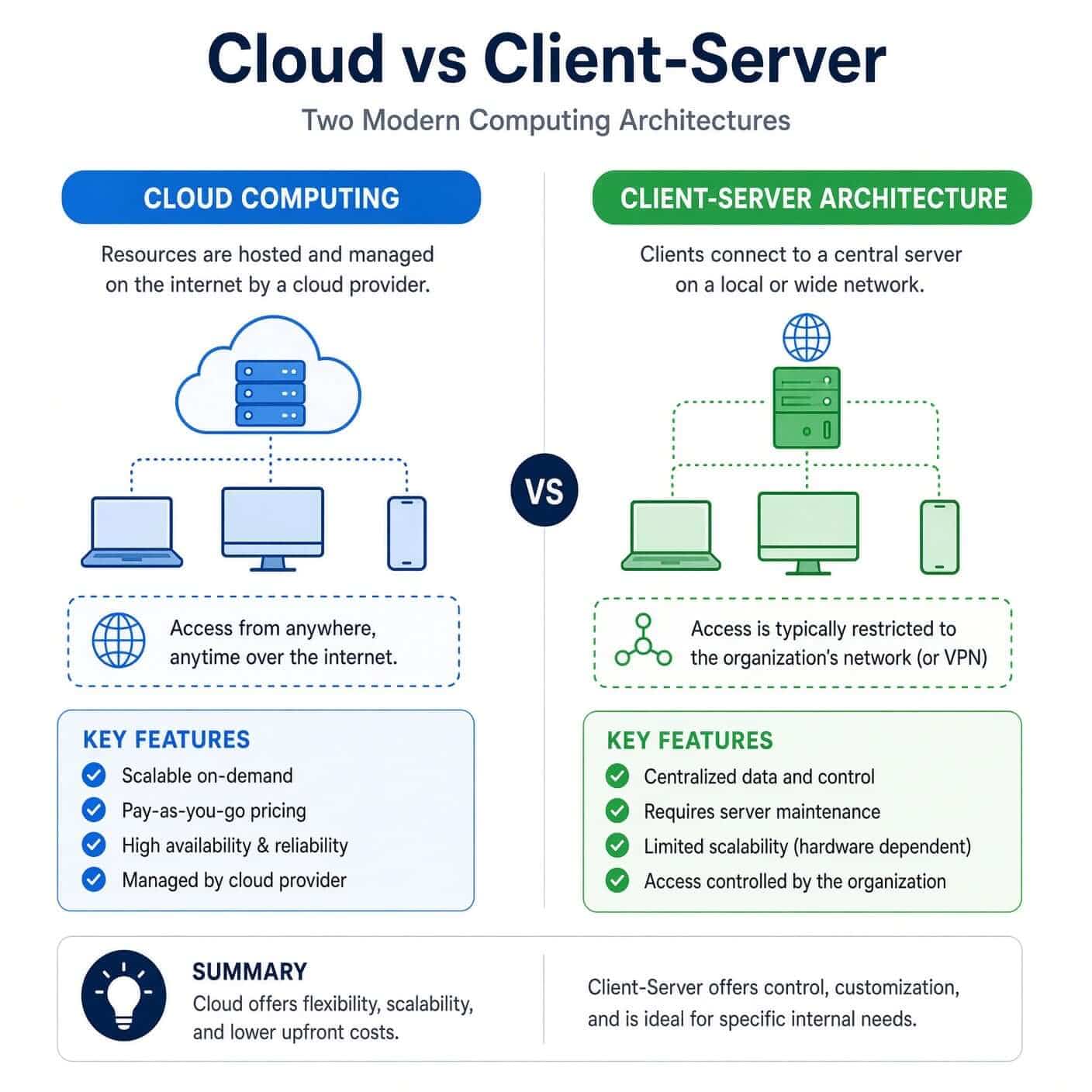
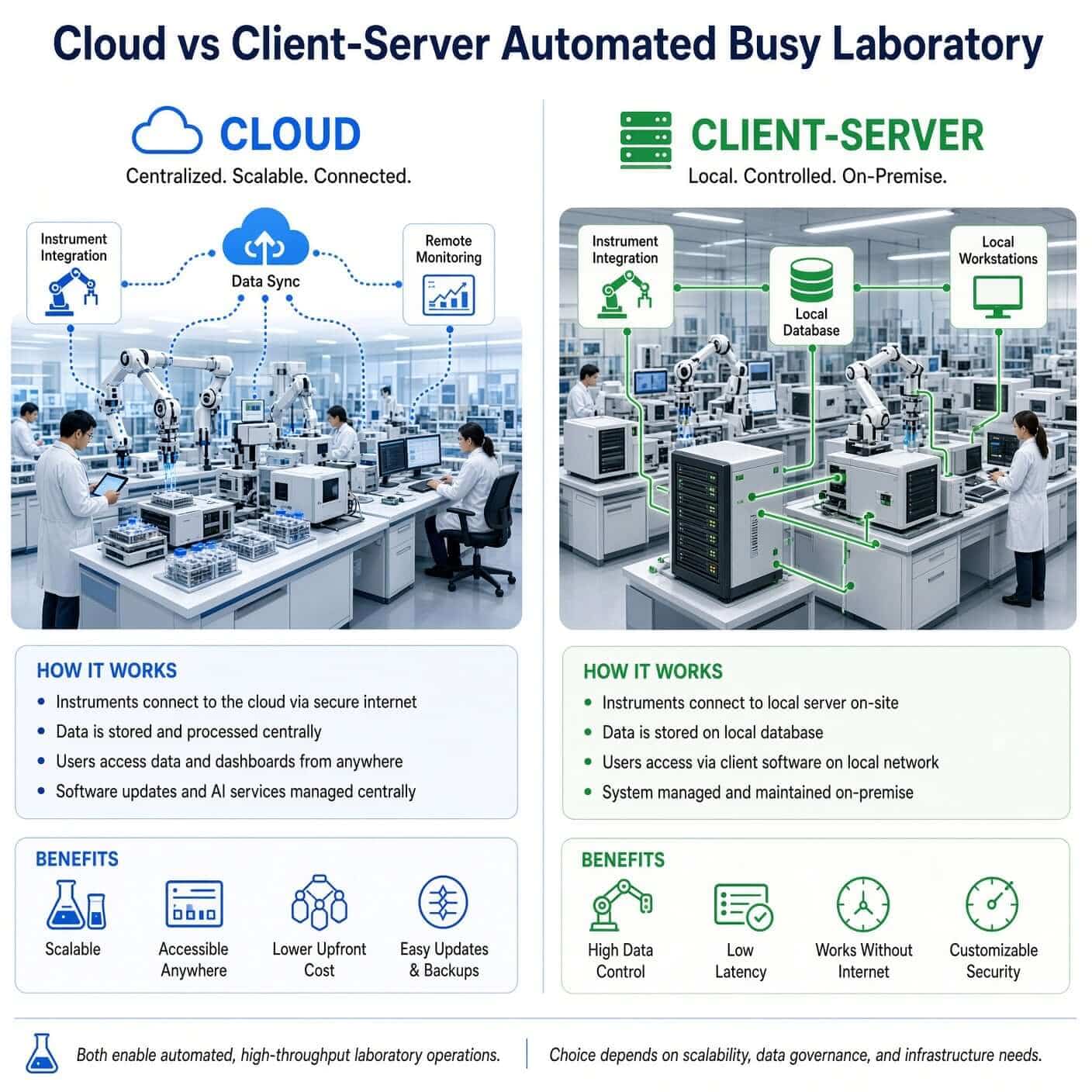
An on-premise LIS runs on hardware your lab or hospital owns. Your team (or a contracted IT partner) owns servers, operating system patches, database backups, disaster recovery, and often the interface engine that talks to analyzers and EMRs. Upgrades usually arrive as projects. Capacity is limited by the servers you maintain.
A cloud LIS is delivered as a managed application. Staff work in a browser. The vendor hosts the application and database, applies updates, and handles infrastructure uptime and backups under a service agreement. Interfaces still matter, but the operational burden of servers and patching shifts to the vendor.
Neither model is automatically more compliant. Both can support CLIA-era expectations for accurate data handling, access control, and auditability. In a cloud LIS vs on-premise decision, the real difference is who carries day-to-day operational risk and how quickly the lab can change.
Why labs reopen this question now
Most labs do not replace an LIS for novelty. They reopen the conversation when something hurts:
- Instrument interfaces are brittle, or support for the old stack is fading.
- Remote or multi-site access depends on fragile VPN workarounds.
- A hardware refresh lands at the same time as a new analyzer go-live.
- Autoverification, molecular, or toxicology workflows outgrow a decade-old configuration.
- Leadership wants predictable software spend instead of surprise capital projects.
Those triggers make a structured hosting evaluation useful: pick the model that fits your volume, specialty mix, and IT reality for the next five to seven years.
Cost: capital spikes versus subscription clarity
On-premise total cost usually includes servers, storage, licenses, database tools, backup services, and the people who keep it alive. Even when the LIS license feels paid for, the infrastructure still ages. A failed disk array overnight is an LIS outage whether or not anyone calls it that.
Cloud pricing is typically subscription-based. You trade capital expense for operating expense. Compare apples to apples: include interface work, validation labor, training, and historical data access in both columns. A fair cloud LIS vs on-premise cost model looks at five years, not the first invoice.
For many mid-size independent and POL environments, cloud wins on predictability. For organizations with strict data-residency mandates or large existing infrastructure teams, on-premise can still pencil out. Put the numbers on one page before politics takes over.
IT burden and uptime
Ask a blunt question: who gets the page when the LIS is down?
In an on-premise world, that page often goes to a small lab IT team or a generalist who also supports practice management. Patch windows, antivirus conflicts, and expired certificates become lab operational events.
In a cloud model, infrastructure incidents are the vendor's problem under an SLA, while the lab still owns workflow configuration, user access, and clinical validation. That split is one of the strongest practical arguments for labs without a deep informatics bench.
Uptime is not only about servers. It is about whether accessioning, result release, and billing continue when a satellite site, courier laptop, or remote reviewer needs access. Cloud architectures are usually built for that pattern. On-premise systems can do it too, but only if remote access was designed well and maintained.
Security, privacy, and quality expectations
Skip the slogans. Ask better questions:
- Where does identifiable patient data live, and who can reach it?
- How are backups tested, not just scheduled?
- Are role-based access and audit trails first-class features?
- What is the change-control process when software updates ship?
Authoritative laboratory groups treat the LIS as a validated information system, not a casual business app. The Clinical and Laboratory Standards Institute (CLSI) publishes guidance on managing and validating laboratory information systems, including data entry, verification, transmission, storage, and retrieval. Whatever hosting model you choose, validation discipline still belongs to the laboratory.
Public health laboratory partners have also documented how LIS projects succeed or fail in the field. The Association of Public Health Laboratories (APHL) LIS project management guidebook is a useful reminder that selection, workflow mapping, training, and go-live planning matter as much as feature lists.
Interfaces deserve the same seriousness. Analyzer and system connectivity is where migrations stumble. CLSI's work on transferring information between clinical laboratory instruments and information systems, including LIS02, underscores why "we will figure out interfaces later" is not a plan.
None of those references require cloud. They do say that whichever side of the hosting decision you pick, you still need validated workflows, controlled access, and trustworthy interfaces.
Instruments, EMRs, and specialty workflows
A polished demo means little if your analyzers, reference-lab feeds, and EMR orders do not land cleanly.
On-premise platforms sometimes win early conversations because everything sits on the local network. That can simplify certain legacy instrument setups. Modern cloud vendors bridge instruments through secure interface approaches and still support HL7-style clinical messaging for orders and results. The evaluation question is concrete: can this vendor map your current catalog, rules, and connections without a two-year custom project?
Specialty mix matters. Toxicology, molecular, and multi-site accessioning create different pressure than a waived-heavy physician office. Your scorecard should weight the workflows you run every day, not a generic hospital checklist. That is the operational heart of cloud LIS vs on-premise for independent and specialty labs. Scalability, changespeed, and migration
On-premise capacity grows in jumps: new server, new license pack, new weekend project. Cloud capacity usually grows with configuration and subscription tiers. The cloud LIS vs on-premise question has distinct differentiators between the choices. Change speed is the quieter differentiator. Need a new site or instrument class? Continuously updated cloud platforms can move faster if your validation process keeps pace. On-premise shops can be extremely stable, which some teams prefer, but stability can become inertia when your test menu shifts.
Replacing an LIS is an operations project wearing a software badge. Before you finalize cloud LIS vs on-premise, inventory:
- Active instruments and interface methods
- Test catalog, calculations, reflex rules, and autoverification logic
- EMR, billing, and reference-lab connections
- Historical result access requirements
- Training needs by role
- A cutover window that will not strand in-flight specimens
Keep the legacy system read-only after go-live. If the inventory is fuzzy, finish discovery before the vendor bake-off.
Decision checklist
Use this scorecard with your lab director, operations lead, and whoever owns IT:
| Question | Favors cloud | Favors on-premise |
|---|---|---|
| Limited internal server or IT capacity? | Yes | No |
| Need easier multi-site or remote access? | Yes | Maybe |
| Prefer subscription over capital refresh cycles? | Yes | No |
| Strict on-site data residency requirement? | Rarely | Often |
| Heavy legacy instruments that demand local-only connectivity? | Case-by-case | Sometimes |
| Want vendor-managed updates and backups? | Yes | No |
If most answers land in the left column, you are looking at a replacement path, not a curiosity project.
Where Stratus DX fits
If your evaluation is moving from theory to shortlist, consider a cloud-native clinical LIS built for the labs that feel this pain: independent laboratories, physician office labs, toxicology programs, and specialty workflows that outgrew workarounds.
Stratus DX offers cloud LIS capabilities designed to reduce on-prem server burden while keeping the operational pieces that matter: accessioning through resulting, instrument connectivity, and specialty modules as labs grow. For lighter physician-office environments, Stratus DX is aimed at connecting waived and near-patient testing into a cleaner clinical workflow without a hospital-scale footprint.
A useful next step is a working session that maps your interfaces, catalog, and cutover constraints against a real cloud configuration. That turns a hosting debate into a timed plan your staff can trust.
Bottom line
The useful version of cloud LIS vs on-premise is operational, not ideological. On-premise can still be right for labs with strong IT capacity or hard residency constraints. Cloud often fits better when leadership wants predictable cost, less hardware drama, and faster multi-site access.
Validate either path with the rigor CLSI and public health laboratory guidance imply: know your interfaces, prove your workflows, and plan cutover like patient care depends on it, because it does.
If you want a cloud LIS conversation grounded in how independent, POL, and toxicology labs actually run, talk with Stratus DX and pressure-test your migration inventory against a live system, not a slide deck.
Frequently asked questions
What is the main difference in a cloud LIS vs on-premise comparison?
The main difference is who runs the infrastructure. With an on-premise LIS, your lab owns the servers, patches, backups, and much of the upkeep. With a cloud LIS, the vendor hosts the system and staff access it through a browser, while your lab still owns workflows, validation, and user access.
Is a cloud LIS less secure or less compliant than on-premise?
Not by default. Both models can meet clinical expectations for access control, audit trails, and data integrity. Compliance depends on configuration, validation, and vendor practices, not the hosting label alone. Ask where data lives, how backups are tested, and how updates are controlled.
When does on-premise still make more sense?
On-premise can still fit labs with strong internal IT, strict on-site data residency rules, or legacy instruments that are difficult to connect outside the local network. If those constraints are real, factor them into your cloud LIS vs on-premise scorecard before shortlisting vendors.
Will switching to a cloud LIS disrupt instrument and EMR interfaces?
It can if discovery is weak. Before cutover, inventory analyzers, HL7 or other clinical feeds, reflex rules, and billing connections. Interface mapping and validation should be part of the project plan, not a post-go-live surprise.
How should labs compare cost between cloud and on-premise?
Look at five-year total cost, not the first invoice. Include servers or subscription fees, IT labor, interfaces, validation, training, and historical data access. Cloud often wins on predictability; on-premise may look cheaper only if you ignore hardware refresh and support time.
How can Stratus DX help if we are ready to move off an on-premise LIS?
Stratus DX provides cloud LIS options for independent labs, physician office labs, and toxicology programs that want less server burden without giving up core clinical workflows. A practical next step is a working session that maps your current catalog, interfaces, and cutover needs against a live Stratus DX configuration.